
Precise Reach: DMflow Broadcast Function
The DMflow.chat chatbot platform provides a powerful Broadcast feature to help you deliver the right message to the right people. Through the smart tag filtering system and user autonomous subscription mechanism, you can achieve highly efficient marketing promotion, not only significantly improving user interaction but also effectively converting potential business opportunities. Creating a personalized communication experience starts with understanding customer needs.
The broadcast function mainly operates in two modes: “Filter Conditions” and “Self-Registration”.
Filter Conditions: Proactive Screening Mechanism
This mode allows you to filter target audiences and send messages based on specific tags and conditions.
By default, you can filter using the following two dimensions:
- Tags
- Last Interaction Time
Platform Limitation Notes:
- LINE and Telegram: Last interaction time is limited to within one year.
- Facebook: Depending on the tag category you choose, Facebook has different strict limits on the sending time window (usually within 24 hours, except for specific tags).
Advanced Filtering: Screening for Specific Users
If you wish to perform more granular screening (such as excluding specific users, or combining more complex conditions), you need to have “Bot Analyst” or “Admin” permissions.
Steps are as follows:
- Go to Logs -> History.
- Set up the filter conditions you want.
- Click the “Publish” button in the interface (as shown below).
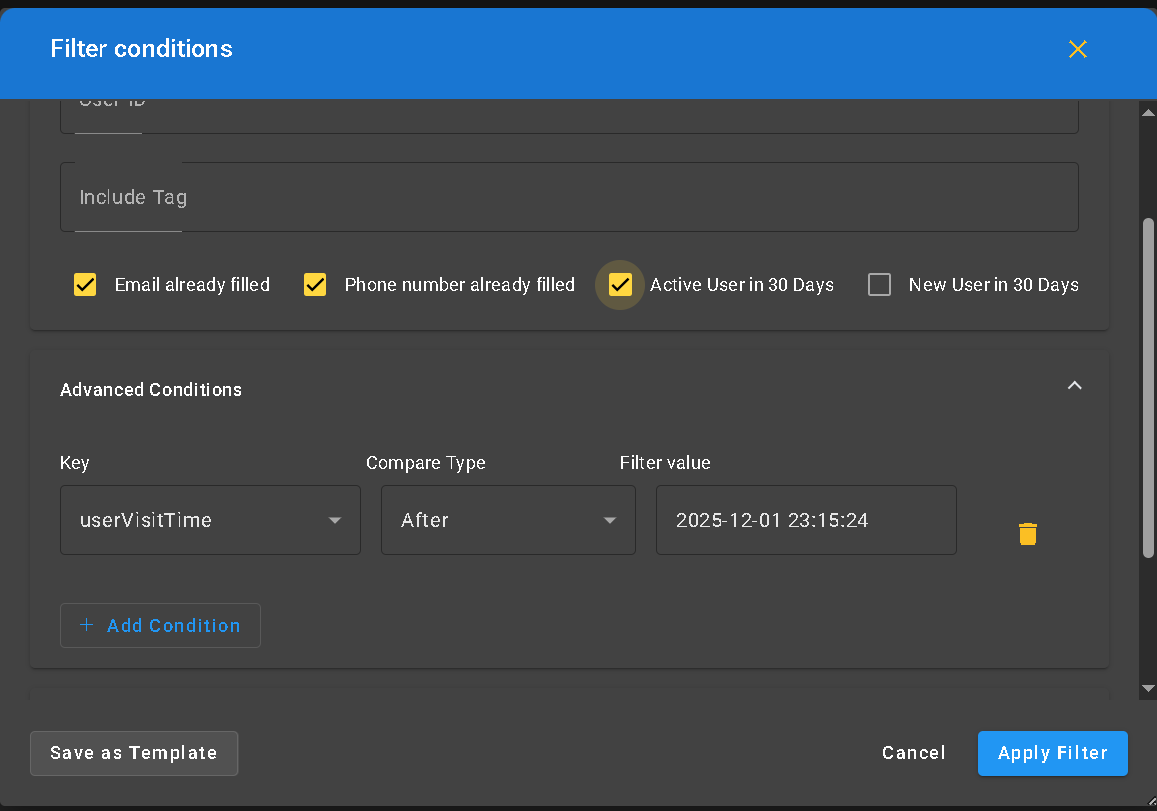
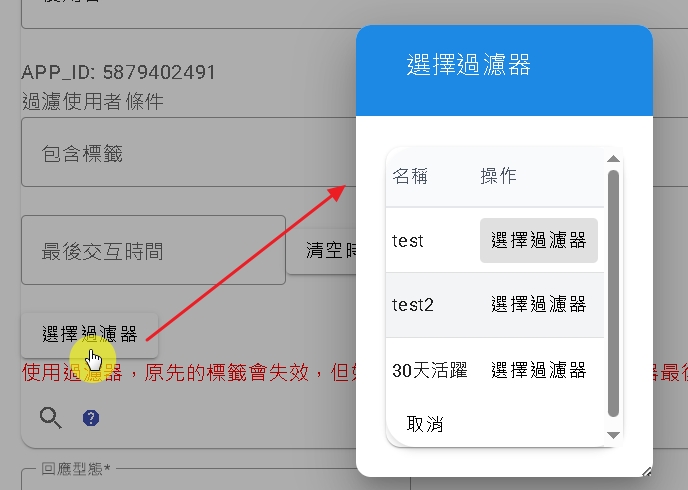
Why is this necessary? Because the “Event Manager” permission design cannot view detailed data of all visitors. Therefore, it must be done by a role with higher permissions setting up filter conditions in the history records and then “Publishing”, so that the event manager can select these created filters for broadcasting.
Self-Registration: Subscription System Respecting User Intent
This is a mode that aligns more with modern user privacy preferences.
When the bot flow calls the “Registration Node”, the system will actively ask the channel user if they are willing to subscribe to specific push content. Only when the user explicitly agrees (confirming subscription status before sending) will the system send broadcast messages to them.
How to Send Broadcasts
You can choose the sending timing according to your needs:
- Send at Fixed Time: Set a specific future time point, and the system will automatically send it then.
- Periodic Schedule (Self-Registration Mode Only): For subscribed users, you can set scheduled sending, such as daily, weekly, or monthly fixed time pushes, suitable for newsletters or regular notifications.
Broadcast Statistics
We provide many dimensions for you to observe broadcast performance:
- You can see if users clicked buttons, and which button they clicked.
- Check who clicked buttons in each time slot within 24 hours or who clicked buttons each day within 30 days.

