
In the process of managing social media, efficiently handling messages from all directions is always a challenge. Many business owners or developers often face a dilemma when looking for chatbot solutions: choose a tool with simple settings but limited functions, or a system with powerful functions but cumbersome settings? dmflow.chat offers a smart balance in this regard. It supports not only a quick-start managed mode but also opens up high-freedom custom configurations, making Facebook Messenger applications no longer restricted.
This article will take you through dmflow.chat’s two major integration modes, automation strategies for social interaction, and how to successfully pass Meta’s strict review to get your bot online to serve the public.
1. Two Distinct Connection Methods, Which One Suits You?
Before starting to use dmflow.chat to connect a Facebook Fan Page, you have to decide on a “relationship mode”. This depends on your level of technical mastery and how much control you want over the system.
Easy-to-Start Managed Mode (Facebook OAuth2)
For most users, time is money. If you want the bot to start working within five minutes, the Simple Managed Mode is definitely the first choice.
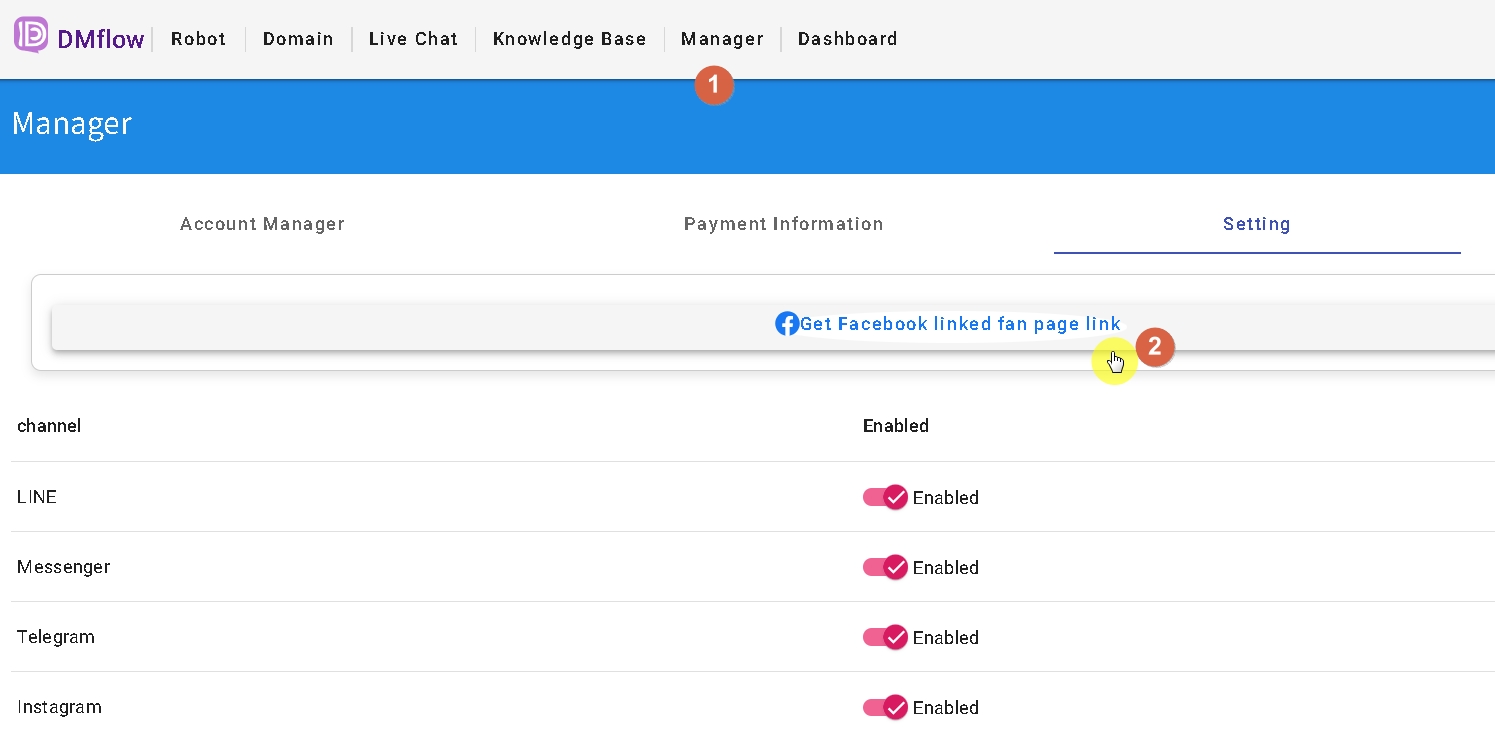
It’s as simple as handing your car keys to a valet. Through the standard Facebook OAuth2 authorization process, you only need to click a few buttons in the dmflow.chat backend (Manage -> Settings -> Facebook), select the fan page you want to manage, and the system will automatically handle all the complicated token exchange and verification work for you.
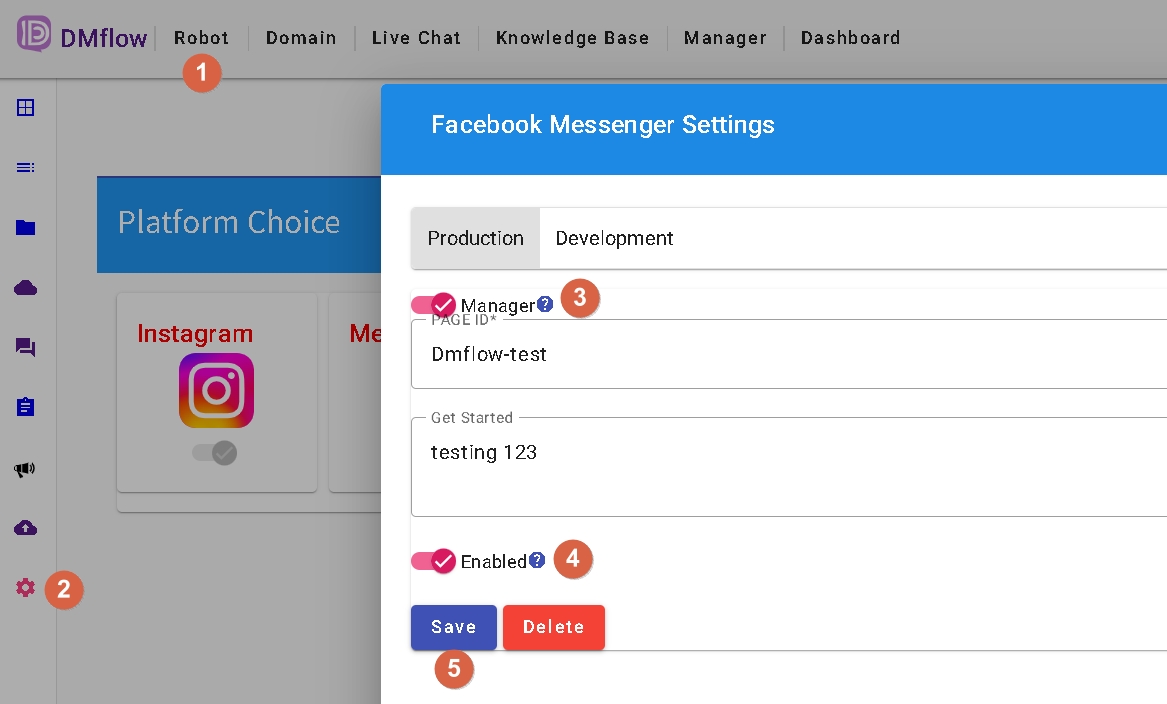
Here is a key point: when you click “Enable Management” in “Bot Settings”, Messenger will start working. This is the friendliest entry point for marketers or non-technical merchants.
However, there is a small drawback to note alongside the convenience. Since this link is based on your personal account authorization, once you change your Facebook password, or the permission structure of the fan page changes, the authorization will become invalid. At this time, the bot will temporarily “lose contact”, and you must log in again and re-authorize to restore operation.
Self-Processing Mode for Full Control
If you are a developer, or your business scenario requires more advanced features, keeping control in your own hands might be more reassuring. dmflow.chat allows users to manually fill in core parameters like APP_ID, APP_SECRET, PAGE_ID, etc.
Why go through this trouble? Honestly, it’s usually for “scalability”.
When you choose manual configuration, you have the opportunity to implement some advanced functions not enabled by default on the platform. For example, Messenger platform-specific account_link (account linking) or thread_control (conversation control), which require lower-level API permissions. In addition, this also reserves more flexibility for the future. If one day you plan to deploy dmflow.chat on a local server (Local Install), or you plan to forward Messenger messages to other channels like Telegram through an intermediary layer, this self-processing mode is a necessary foundation.
2. Bringing Post Interactions to Life: Comment Reply and Private Message Strategies
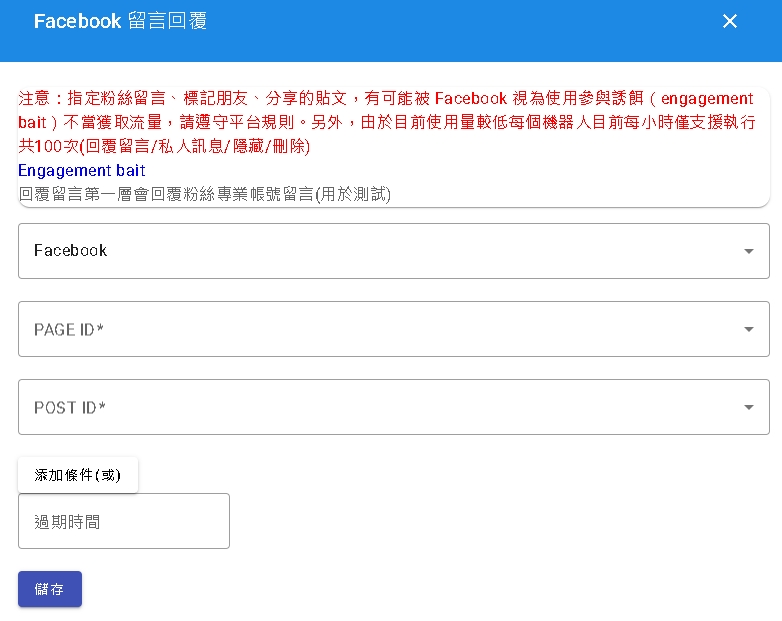
In addition to handling private messages, how to respond to comments under public posts often determines the liveliness of a fan page. dmflow.chat extends the bot’s reach to the comment section, supporting automated comment replies for Facebook and Instagram.
This feature is not just “replying”; it also includes permissions for private message replies, hiding comments, and even deleting comments. This is very practical for managing negative reviews or holding lucky draw events.
Suggestions for Interaction Strategy
Although the system provides testing options allowing you to test against “First-level Comments”, in formal environment operations, it is recommended that everyone focuses on Private Reply.
Although replying directly in the public comment area can increase exposure, excessive bot replies can sometimes make the layout look cluttered and even be judged as spam by the Facebook algorithm. Conversely, through private message replies, you can not only establish a more private connection but also create the best timing to guide users into the conversation flow (Flow). Since you are automating, maximizing the guiding effect is the smart way to go.
3. Moving Towards Official Release: Survival Guide for Meta App Review
After development is complete, the most headache-inducing hurdle is often Meta (Facebook)’s App Review. If your bot needs to serve the general public, not just administrators or testers, you must switch the App Mode from Development to LIVE, which requires applying for pages_messaging permission.
This process is often frustrating, but mastering a few keys can significantly increase the pass rate.
Prepare a Real Test Environment
Reviewers need to actually operate your bot. The most common mistake here is providing a casual test account. Please be sure to provide a real Facebook account with Two-Factor Authentication (2FA) enabled to the reviewer. If the account looks fake, or is locked due to abnormal login, the review will fail directly.
Clearly Write “Why” and “How”
For users who need to switch the bot from “Development Mode” to “Online Mode (LIVE)” and provide services to all Facebook users, dmflow.chat provides guidelines for passing APP REVIEW to obtain the necessary pages_messaging permission.
- Switch App Mode from Development to LIVE.
- Add a tester account. Note that the tester account must use a real account and enable 2FA to avoid being banned from logging in by Facebook.
- Fill in permission usage explanation (
Tell us how you're using this permission or feature), clearly explaining the reason for applying forpages_messaging, such as automatically answering customer questions. - Provide test steps (
Please provide step-by-step instructions...), guiding reviewers on how to log in to the tester account and go to your fan pagem.me/to test the bot.
💡 Supplementary Information: For specific operations of APP REVIEW, please refer to Facebook official documentation: Graph API Get Started and Graph API Explorer.
Frequently Asked Questions (FAQ)
Q: If I change my Facebook personal account password, will the bot be affected? A: Yes. If you are using “Simple Managed Mode (Facebook OAuth2)”, changing the password will cause the original authorization token to become invalid, and the bot will not function. You need to return to the dmflow.chat backend to re-authorize the connection. If you wish to avoid this situation, it is recommended to adopt the “Self-Processing Mode”.
Q: Can I use dmflow.chat to implement special Messenger functions? A: Yes. Through “Self-Processing Mode”, you can manually configure API parameters, which gives you the opportunity to integrate functions outside the default interface of dmflow.chat, such as Account Linking or more complex conversation control, suitable for teams with development capabilities.
Q: Are there any special requirements for the test account when applying for Meta App Review? A: Be sure to provide a “Real” account with “Two-Factor Authentication (2FA) Enabled”. Facebook is very sensitive to account security. Using a newly registered empty account or an account without 2FA enabled can easily lead to login failure or being judged as a violation, leading to review failure.

