
Make Customer Service Easier: Full Feature Breakdown and Hands-On Test of the LINE Official Account AI Chatbot (β)

Creation at: 2025-12-02 | Last modified at: 2025-12-02 | 5 min read
The LINE Official Account has introduced a brand-new AI Chatbot (β) feature. Can you really upgrade your customer service experience for just a few hundred NT dollars? This article explains in detail how to auto-generate Q&A from PDFs, how the feature actually works, its industry restrictions, and how it differs from traditional keyword replies. Curious whether this system is truly intelligent or simply doing document retrieval? This hands-on review will tell you.
Anyone who manages a LINE Official Account has probably experienced this: your phone keeps buzzing, and when you open it, eight out of ten customers are asking the same questions — “What are your business hours?”, “Do you still have seats available?”, “Where’s the price list?”
While keyword auto-reply can solve part of the problem, customers can easily stump the old chatbot simply by changing their wording. For example, replacing “business hours” with “what time do you open” often causes the bot to fail.
This is where LINE’s AI Chatbot (β) becomes appealing. It claims to understand natural language and even read files to auto-generate a Q&A database. But is it really that smart? How does it work behind the scenes? This article walks you step-by-step through its pros, cons, and operational details.
What Is the LINE AI Chatbot (β)?
Simply put, it is a more flexible form of automation compared to traditional keyword replies.
Old-style keyword replies are rigid and require exact match triggers. The AI Chatbot (β), however, can understand the intent behind different phrasings. This means that as long as the customer expresses a similar meaning, the AI can pick the correct pre-set answer.
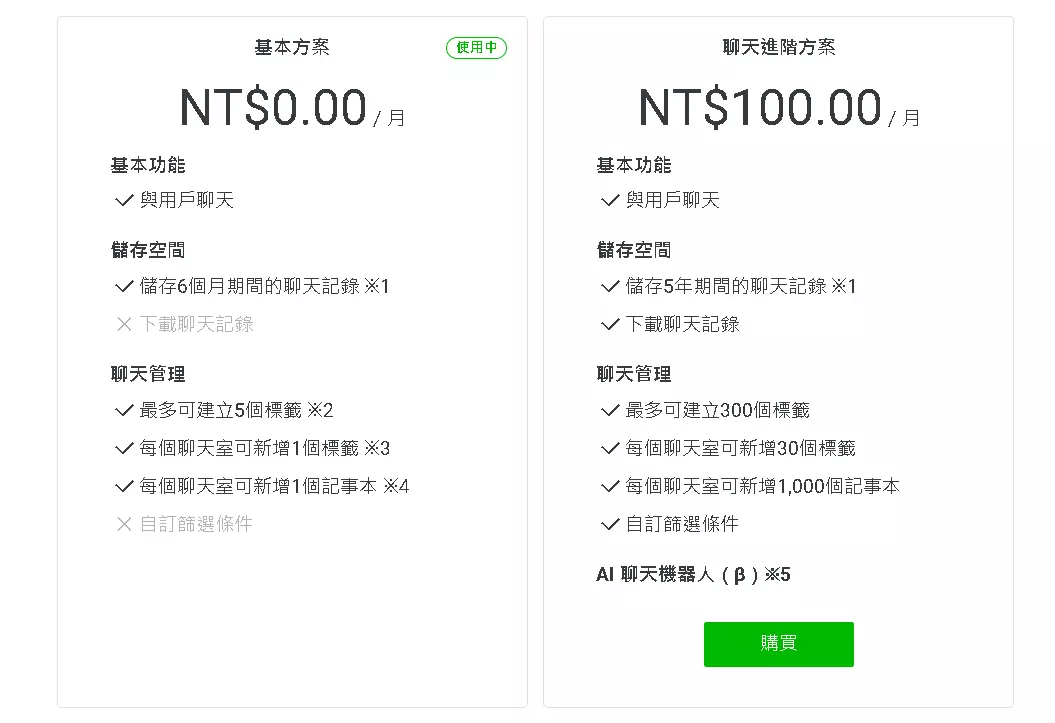
This feature is included in the “Advanced Messaging Plan”, which costs NT$100 per month — a low-risk investment for small and medium-sized businesses to get a 24/7 basic customer-service assistant.
Three Ways to Build Its “Brain”: Teaching the AI How to Answer
To let the AI respond correctly, you must first feed it information. The LINE backend offers three ways to create FAQs, all very intuitive.
1. Create Single Q&A Entries — Perfect for Fine-Tuning
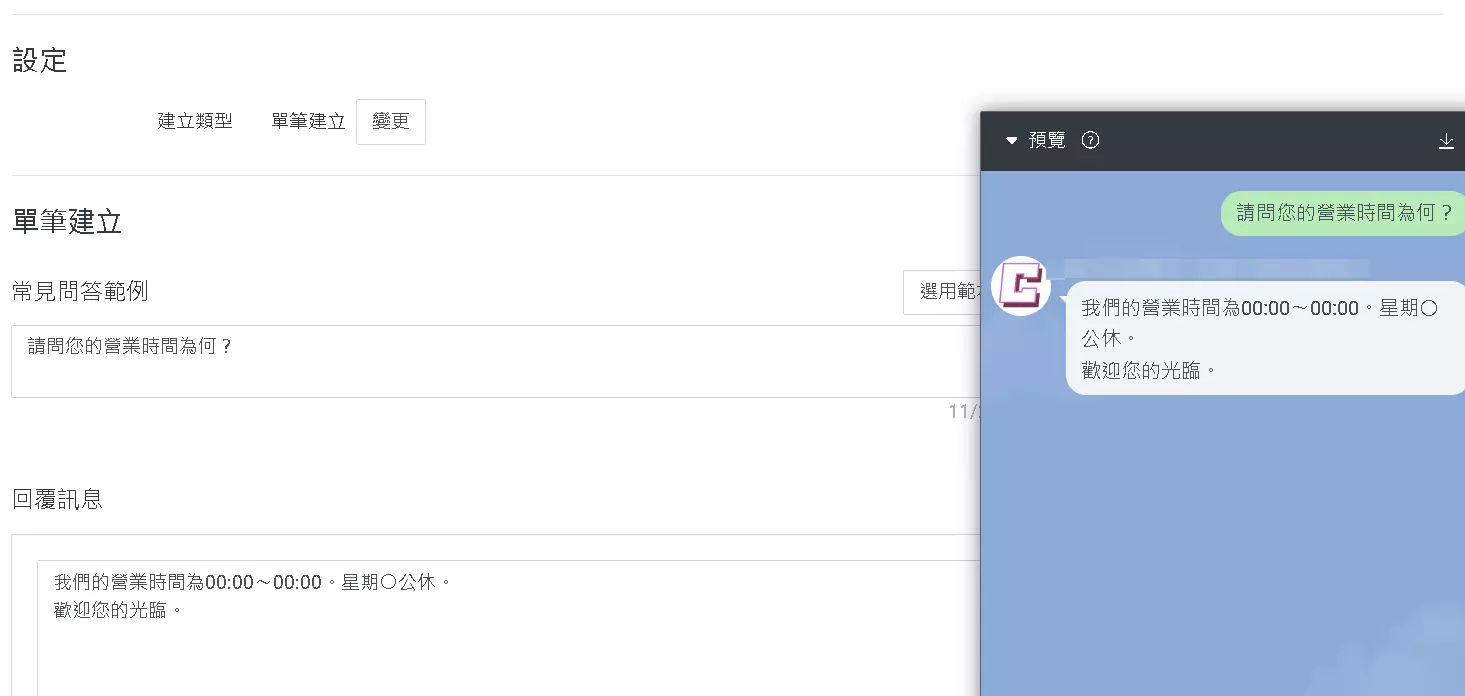
This method is the most basic: manually entering each question and answer pair. It’s ideal for very specific questions or those missed by AI-generated content. Although it takes time, accuracy is fully under your control.
2. Bulk Import — Best for Large Data Sets
If you already have a customer-service FAQ in Excel format, this is extremely useful. The system supports CSV upload, allowing you to import large numbers of Q&A pairs at once — saving you hours of copy-paste work.
3. Auto-Generation — The Star Feature (PDF & Image Recognition)
This update’s most eye-catching feature is automated Q&A creation. You simply upload existing materials, and the AI will “read” them.
- Supported formats: PDF, JPEG, PNG
- File size limit: 30 MB
- Pro tip: If your business has a website, export your FAQ page or product page as a PDF and upload it — the AI will auto-extract multiple Q&A pairs.
After uploading, the system shows a review list before importing, giving you full control.
How It Actually Works: Is It Generative AI or a Search Engine?
Time to be honest — this is what most business owners care about.
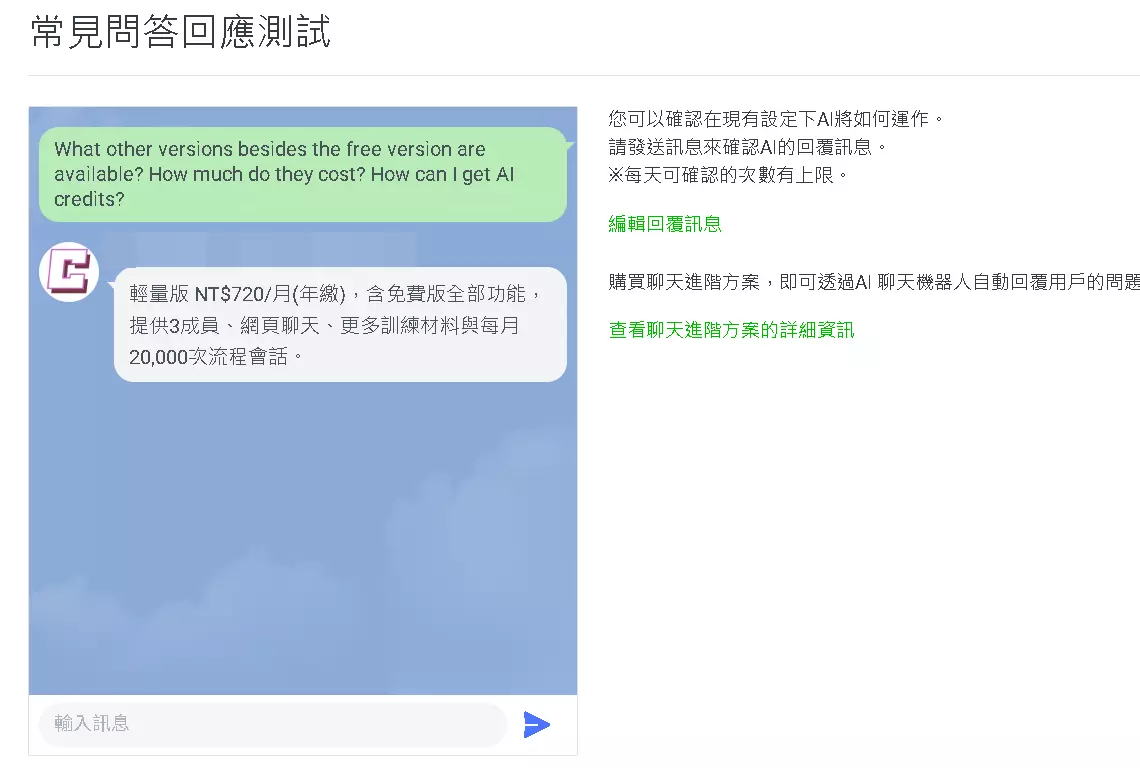
Despite the “AI” label, testing shows it behaves more like semantic search (embeddings) with similarity matching, rather than a full generative model like ChatGPT.
Key Observations:
- It does not invent answers. It only retrieves answers from your database — no summarizing, rewriting, or combining multiple answers.
- Language limitations. If your Q&A is in Chinese and a customer asks in English, the AI might understand the question but will still reply in Chinese. It does not translate responses.
- Cannot handle multi-step instructions. If a customer asks two unrelated questions at once, it chooses only the highest-confidence one.
So think of it as a “search engine that understands natural language”, not a human-like conversational AI.
Improvement Over Time: The AI Needs Training Too
After enabling the system, you can continue improving it using the “Improve FAQs” feature.
This collects real customer queries and their satisfaction ratings (like / dislike) and lets the AI suggest improvements. For example:
- “Many users asked this recently; consider adding this Q&A.”
- “Users seem confused by this answer; consider rewriting it.”
Limit: Auto-generation and improvement suggestions each have a monthly limit of 30 uses.
Industry Restrictions & Usage Policies
Not all accounts can use this feature, even if they pay.
Because AI may process conversation content, LINE restricts industries that involve sensitive personal data.
Industries likely to be denied access:
- Healthcare: hospitals, clinics, rehabilitation centers
- Financial services: banks, insurance, securities, loans
- Religious organizations: temples, churches, shrines
- Politics & government: agencies, political parties, politicians
- Legal services: law firms
These sectors often involve extremely sensitive information (medical records, financial data, political views), so LINE may reject activation after manual review.
Frequently Asked Questions (FAQ)
Q1: How is the AI Chatbot (β) different from the free keyword auto-reply?
Keyword auto-reply requires an exact match to trigger. The AI Chatbot (β) uses natural language understanding and can recognize different phrasings of the same intent.
Q2: Can I still reply manually after enabling AI?
Yes. You can switch modes anytime. Many businesses use AI for basic questions and switch to human support when needed.
Q3: Is this feature free?
No. It is part of the Advanced Messaging Plan, costing NT$100 per month.
Q4: Are there limits on auto-generated Q&A?
Yes. Only PDF, JPEG, and PNG are supported, up to 30 MB. Auto-generation has a 30-times-per-month limit.
Q5: Can the AI proactively message users?
No. It only responds after a user sends a message.
Q6: Why does it reply in Chinese even when asked in English?
Because it retrieves the closest matching answer as-is. It does not translate.
Conclusion: Is It Worth Upgrading?
For businesses overwhelmed by repetitive questions — restaurants, e-commerce sellers, event organizers — this NT$100 monthly feature is absolutely worth it. It won’t replace human staff, but it can easily handle 70–80% of common inquiries.
The PDF-based auto-generation significantly lowers setup time. As long as you’re not in a restricted industry and you review responses regularly, this tool can genuinely simplify your workload.
A great way to start is to prepare a simple FAQ PDF and try the plan for one month to see the difference it makes.

